
Vizuara Kernel Engineering
Mentor Handbook · 06 Delivery Craft

Workshop plans: the six deep-dives

By the end of this chapter you'll be able to walk into any of the six deep-dive workshops and run it — you'll know what each one is really about, the one metaphor that anchors it, the single live demo that makes the room gasp, and the exact minute-by-minute shape of the session. Think of this chapter as your set of six teaching maps. Each map is small enough to hold in your head and detailed enough that you never stand at the board wondering "what comes next?"

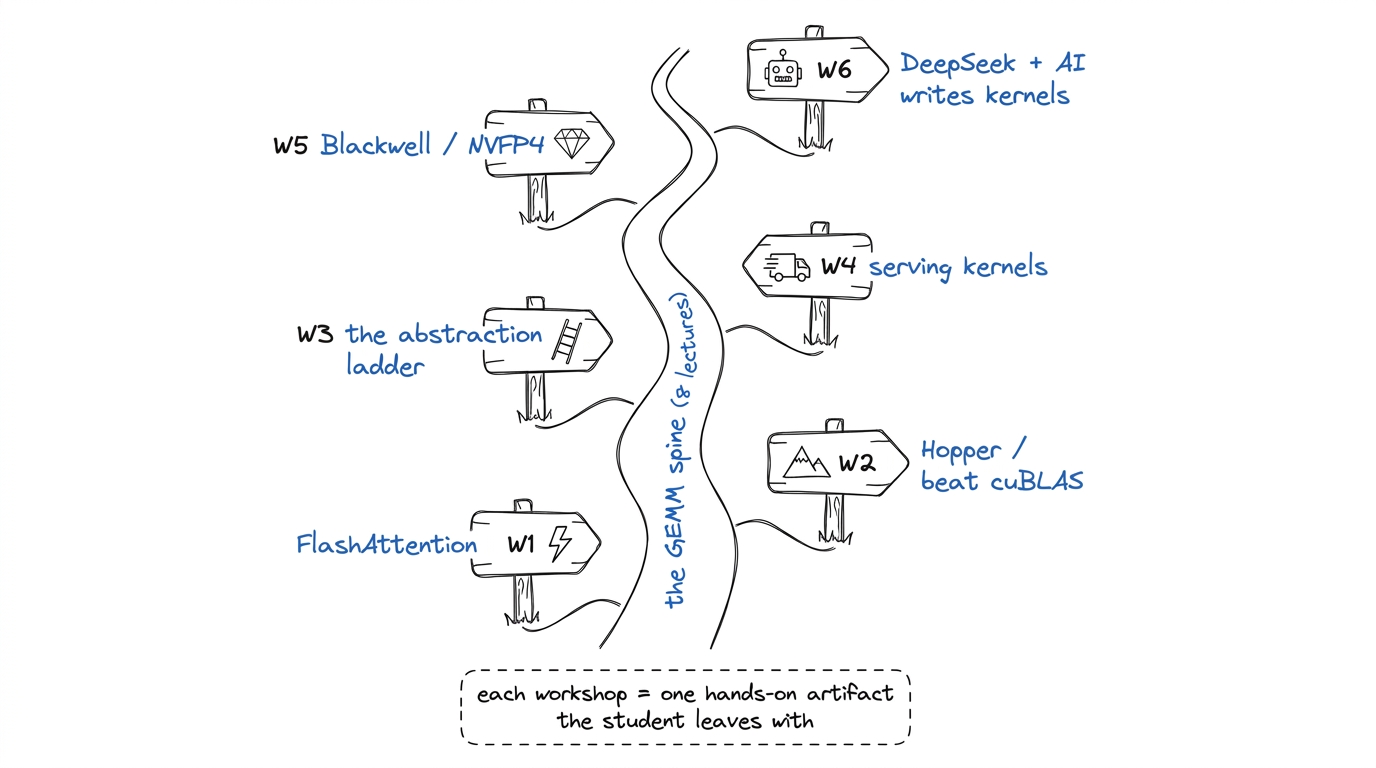
The eight foundational lectures build the spine: what a GPU is, how to program it, the memory hierarchy, the GEMM ladder. The six workshops are where that spine grows teeth — each takes the student to a real, modern, money-making frontier. A lecture teaches an idea. A workshop makes them build the thing. So every map below is built around one hands-on artifact the student leaves with.
🎓 Teaching note
The golden rule for all six workshops: one artifact per session. Not a tour, not a survey — one thing the student writes, runs, and profiles with their own hands. If you find yourself lecturing for more than fifteen minutes without them typing, you've drifted. Say to yourself: "what are their fingers doing right now?"
The six workshops as trailheads branching off the main GEMM spine — each a hands-on deep-dive.figure rendering · The six workshops as trailheads branching off the main GEMM spine — ea
The six workshops as trailheads branching off the main GEMM spine — each a hands-on deep-dive.

W1 — FlashAttention from scratch

What it's really about: attention is the heart of every transformer, and the naive way to compute it wastes enormous memory traffic. FlashAttention is the fix that took over the industry. Here the student builds a working FlashAttention forward pass by hand.

🧠 Metaphor
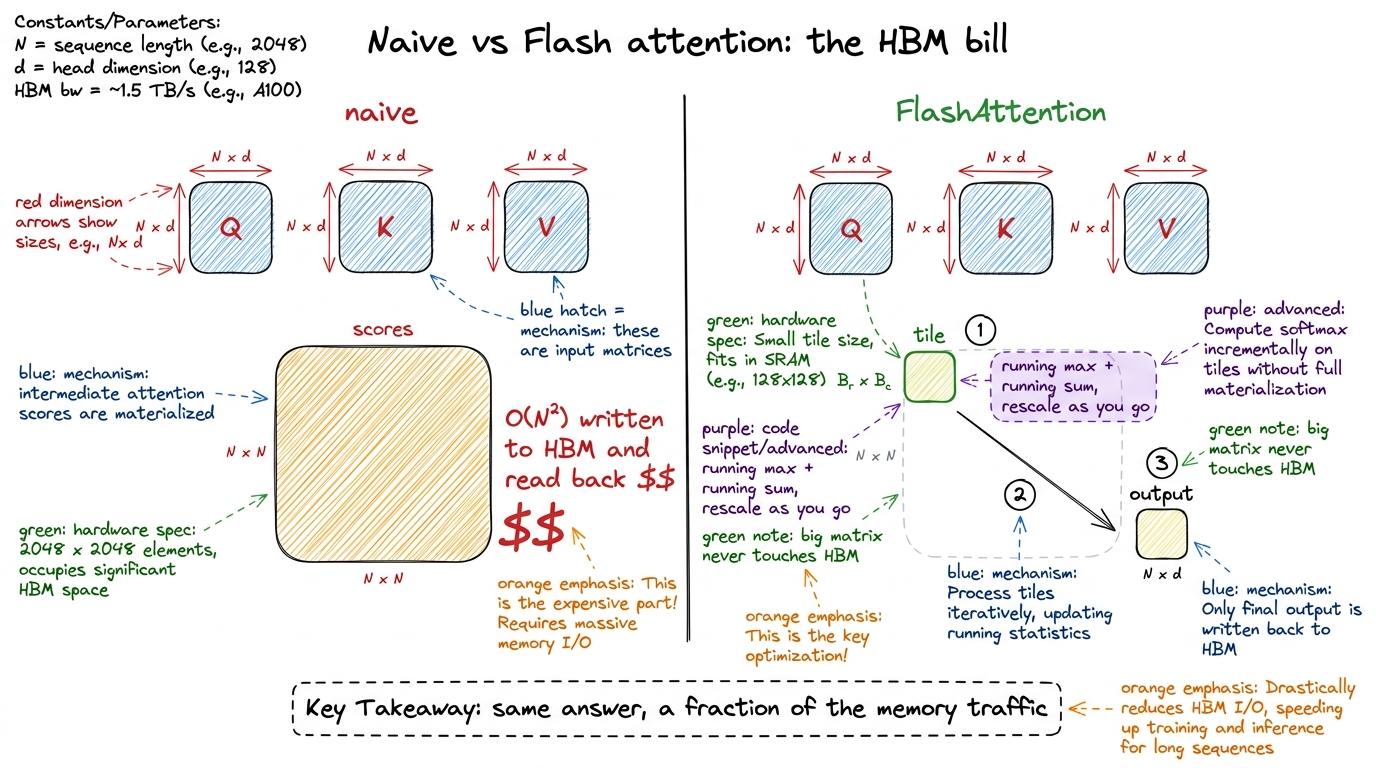
Naive attention is a student doing a huge multiplication on paper, writing the entire intermediate scratch-work out in full, filling a whole notebook (that's the giant N×N attention-score matrix), then reading it all back to finish. FlashAttention is the student who does the same sum in their head one chunk at a time, keeping only a running total — never writing the giant notebook at all. Same answer, but they never paid for the paper. The "paper" here is slow HBM memory, and not touching it is the entire trick.

The magic ingredient is online softmax: a way to compute softmax over a long row while only ever looking at one tile of it at a time, carrying a running maximum and a running sum, and rescaling the partial answer as new tiles arrive. Students find rescaling spooky, so slow down there.

🔢 By hand
Do online softmax by hand on the board with just four numbers, in two tiles of two. Tile 1 is [1, 3]; tile 2 is [2, 5]. Process tile 1: running max = 3, running sum of exp = e^(1-3)+e^(3-3) ≈ 1.14. Then tile 2 arrives with a bigger max of 5 — so you rescale the old sum by e^(3-5), then add the new tile's contribution. Land on the same answer you'd get from softmaxing all four at once. When they see the two paths agree, rescaling stops being scary.
🏭 In production today
This is not academic. FlashAttention is in every serving stack today — vLLM, PyTorch's SDPA, TensorRT-LLM. When you chat with almost any model, its attention is running a descendant of exactly the kernel your students are building. FA2 improved the work-partitioning; FA3 added Hopper warp-specialization and pingpong scheduling. Your students touch the real lineage.
The core of W1: naive attention pays for a giant matrix in HBM; FlashAttention never writes it.figure rendering · The core of W1: naive attention pays for a giant matrix in HBM; FlashA
The core of W1: naive attention pays for a giant matrix in HBM; FlashAttention never writes it.

Running the session (3 hours):

  • 0–20 min — Board: attention as three matmuls plus a softmax. Draw the giant N×N scores matrix and circle it in red — "this is the enemy."
  • 20–45 min — The online-softmax by-hand demo above. Everyone does it on paper with you.
  • 45–90 min — Live build: the FA forward tiling loop, single head, simplified. Students type it. Add causal masking last (just "skip tiles above the diagonal").
  • 90–100 min — Break.
  • 100–150 min — Benchmark their kernel vs PyTorch SDPA. This is the jaw-drop.
  • 150–180 min — Conceptual tour of FA2 (better work split) and FA3 (Hopper warp-specialization). No code, just "here's what changes and why."
The click
The jaw-drop number: run their simple FA against naive attention at sequence length 4096 and show the memory traffic collapse — naive materializes ~67 million score entries per head; Flash materializes a tile at a time. Say: "you just cut the memory bill by the length of the sequence, and that is why this one paper changed how every model on Earth is served."
⚠️ Where students trip
Students think FlashAttention is faster because it does less math. It doesn't — it does the same math (sometimes slightly more, from rescaling). It's faster because it does far less memory movement. Fix it with one line: "Flash doesn't compute less; it remembers less." Tie it straight back to the cafeteria: the bottleneck was always feeding the cooks, never the cooking.

W2 — Hopper: outperforming cuBLAS on H100

What it's really about: NVIDIA's own library, cuBLAS, is ferociously well-tuned. This workshop asks the audacious question — can a human beat it? — and walks two real worklogs where people did, on the H100 (the "Hopper" generation). The student learns the specific Hopper features that make it possible.

🧠 Metaphor
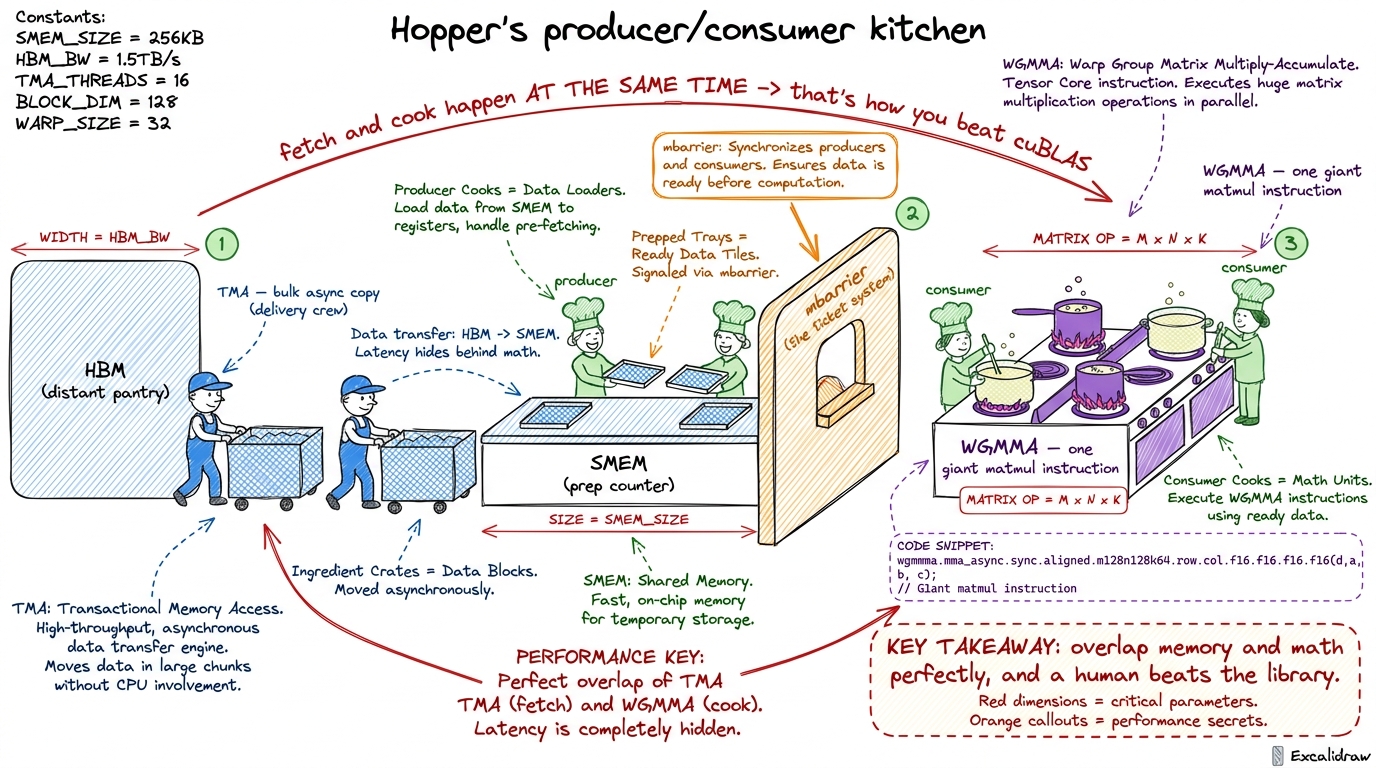
Older GPUs make each cook fetch their own ingredients from the pantry. Hopper adds a dedicated delivery crew (the TMA, Tensor Memory Accelerator) whose only job is to haul big blocks of ingredients to the counter while the cooks keep cooking. And it splits the kitchen into specialists: some workers only fetch (producers), others only cook (consumers), coordinated by a ticket system (mbarriers). Beating cuBLAS is mostly about running this producer/consumer kitchen perfectly.

The three Hopper words to teach, in order: TMA (async bulk copies — the delivery crew), WGMMA (wgmma m64nNk16, a whole warpgroup doing one giant matmul instruction), and warp specialization (producers fetch, consumers compute, overlapping perfectly).
🏭 In production today
This is the actual craft of a paid kernel engineer. "Beat cuBLAS on H100" is a real hiring bar. The two worklogs studied here (hamzaelshafie and cudaforfun) are real engineers publishing real numbers. When a student can explain why a producer/consumer split with TMA overlaps memory and math, they can hold a conversation in any GPU performance team.
W2's anchor: Hopper as a specialized kitchen where a delivery crew feeds cooks continuously.figure rendering · W2's anchor: Hopper as a specialized kitchen where a delivery crew fee
W2's anchor: Hopper as a specialized kitchen where a delivery crew feeds cooks continuously.

Running the session (3 hours):

  • 0–25 min — Frame the challenge: "cuBLAS is the champion; today we study the two people who beat it." Draw the producer/consumer kitchen.
  • 25–70 min — TMA and WGMMA walk-through with code snippets from the worklogs. Emphasize overlap, drawn as two timelines that slide over each other.
  • 70–80 min — Break.
  • 80–140 min — Live: read the actual Hopper SASS with them; find the WGMMA instructions and the async copies. This is a reading session, not a writing one — set that expectation.
  • 140–180 min — The scoreboard: their understanding mapped onto the worklogs' final numbers vs cuBLAS. Discuss what the last few percent cost.
⚠️ Where students trip
Students assume "beating cuBLAS" means a cleverer math formula. It never does — the math is identical GEMM. The win is scheduling: overlapping the delivery crew with the cooks so neither ever waits. The unlocking line: "You don't beat cuBLAS at math. You beat it at logistics."

W3 — The abstraction ladder: Triton → CUTLASS/CuTe → TileLang

What it's really about: you don't always have to write raw CUDA. There's a ladder of tools, each higher rung doing more for you but giving you less control. This workshop climbs the ladder so students know which rung to stand on for a given job.
🧠 Metaphor
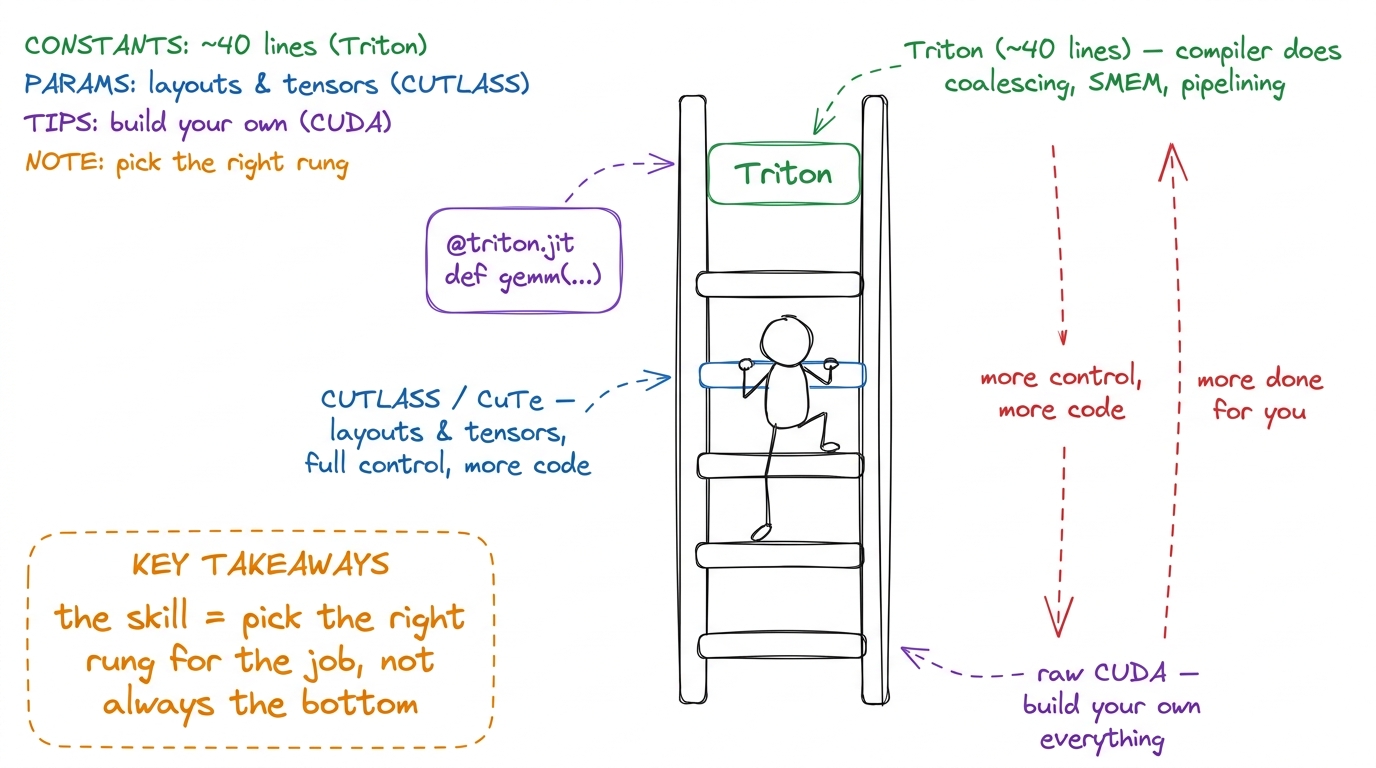
Cooking dinner at three levels. Triton is a meal-kit: forty lines and the compiler handles coalescing, shared memory, and pipelining for you — you just describe the recipe. CUTLASS/CuTe is cooking from raw ingredients with professional tools (CuTe "layouts" are the labeled measuring cups) — more work, total control. Raw CUDA is foraging and building your own stove. The skill isn't always dropping to the bottom; it's knowing which level the meal deserves.
🔢 By hand
The single most persuasive moment: put a ~40-line Triton GEMM on screen next to the ~600-line CUDA GEMM from the L4–L5 ladder that does roughly the same thing. Let the size difference just sit there. Then say: "the Triton compiler wrote the coalescing and the shared-memory tiling for you — the stuff we spent two lectures on by hand."
🏭 In production today
Triton powers a huge share of real kernels — much of PyTorch's own generated code and many custom fused ops ship as Triton. CUTLASS/CuTe is what NVIDIA and serious teams reach for when Triton's ceiling isn't high enough. Knowing both, and when to switch, is exactly what production teams need.
W3's ladder: Triton at the top does the most for you; raw CUDA at the bottom gives the most control.figure rendering · W3's ladder: Triton at the top does the most for you; raw CUDA at the
W3's ladder: Triton at the top does the most for you; raw CUDA at the bottom gives the most control.

Running the session (3 hours):

  • 0–20 min — Draw the ladder. Set the theme: "higher = less code, less control."
  • 20–70 min — Live: rewrite GEMM in Triton together (~40 lines). Then FA in Triton. Celebrate how short it is.
  • 70–80 min — Break.
  • 80–150 min — "CUTLASS the hard way" (kapilsh): naive GEMM → CuTe layouts/tensors → a real CUTLASS GEMM. Read CUTLASS's warptiling using the exact vocabulary from lecture L5 — students realize they already know what CUTLASS is doing.
  • 150–180 min — Tour of TileLang / CuTe-DSL, and a clear decision rule for "when to drop to raw CUDA."
⚠️ Where students trip
Students hear "Triton is easier" and conclude "always use Triton." Correct gently: higher rungs have a ceiling. When you need a Hopper-specific trick the compiler won't emit, you drop down. The line: "Triton until it can't; then CUTLASS; then raw CUDA — and knowing which one you're in is the real skill."

W4 — Inference-serving kernels

What it's really about: training a model and serving it to users are different games. Serving has two phases with wildly different kernel needs, and this workshop teaches the kernels that make a served model cheap.

🧠 Metaphor
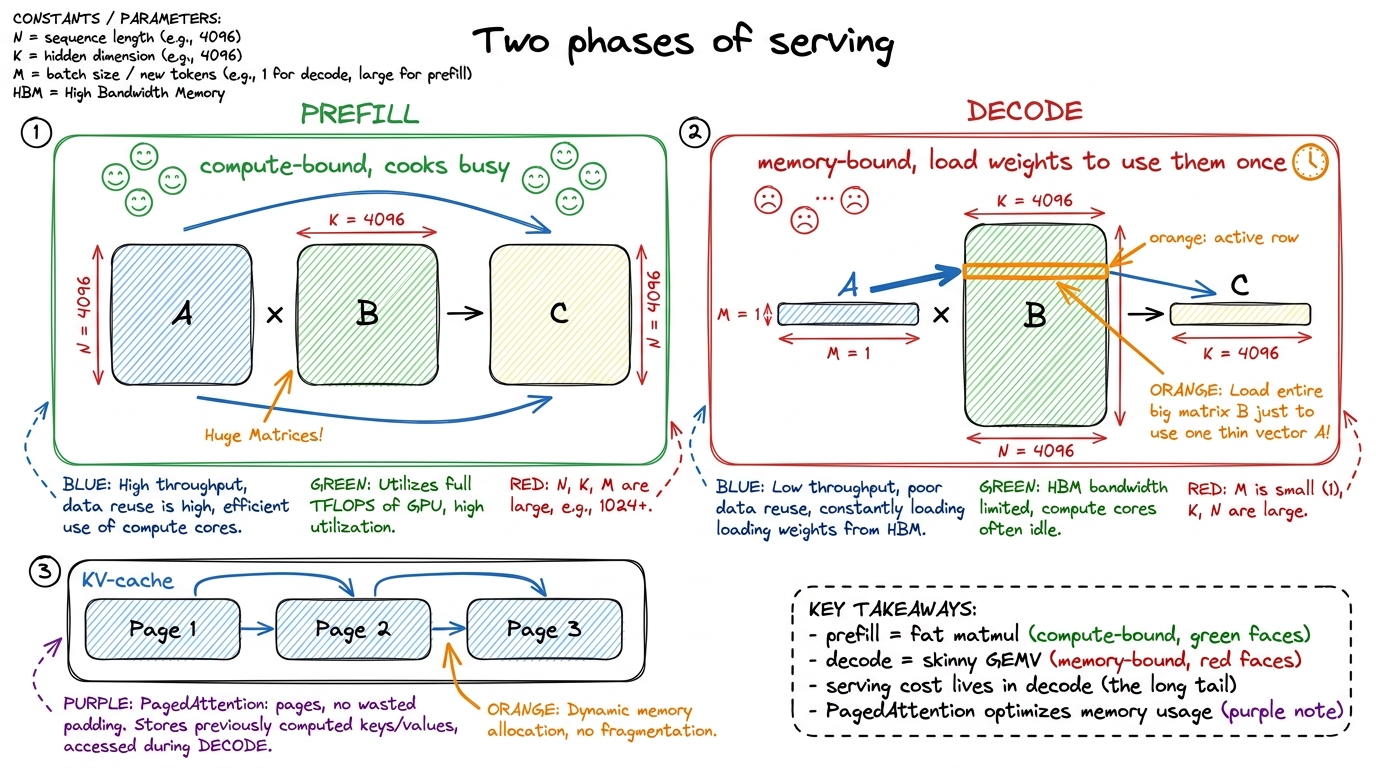
Serving a model is a restaurant with two rhythms. Prefill is the big banquet order landing all at once — lots of parallel work, the cooks are busy and happy (compute-bound, a fat matmul). Decode is the à-la-carte trickle afterward — one token at a time, the kitchen mostly idle waiting on the pantry (memory-bound, a skinny GEMV). Different rhythms need different kitchen tricks, and getting decode right is where the money is.
🔢 By hand
Contrast the two shapes on the board. Prefill: a matrix times a matrix — big, square-ish, lots of arithmetic per byte loaded. Decode: a vector times a matrix (a GEMV) — one new token, so almost no arithmetic reuse; you load a huge weight matrix to do one skinny multiply. Say: "decode is memory-bound because you pay full price to load the weights and only use them once." That single sentence explains why decode kernels look so different.

The named kernels to teach: PagedAttention (the KV-cache stored in pages, like OS virtual memory, so you don't waste memory on padding), fusion (RMSNorm+QKV, SwiGLU — do several small ops in one kernel to avoid round-trips to HBM), and quantized kernels (FP8, W4A16 — smaller numbers, less to move).
🏭 In production today
This is vLLM. PagedAttention is vLLM's headline invention and it's why vLLM serves so many more users per GPU than the naive approach. Continuous batching, paged KV, fused norms — this workshop is a tour of the exact kernels running behind every production LLM API today.
W4's frame: prefill is a compute-bound banquet, decode is a memory-bound trickle — and PagedAttention manages the KV cacfigure rendering · W4's frame: prefill is a compute-bound banquet, decode is a memory-bou
W4's frame: prefill is a compute-bound banquet, decode is a memory-bound trickle — and PagedAttention manages the KV cache.

Running the session (3 hours):

  • 0–30 min — Prefill vs decode on the board; the fat-matmul-vs-skinny-GEMV contrast. Everyone must be able to say why decode is memory-bound.
  • 30–75 min — KV-cache layouts and the PagedAttention idea (borrow the OS virtual-memory picture). Walk the kernel.
  • 75–85 min — Break.
  • 85–140 min — Live: write a simple fused kernel (e.g. RMSNorm+QKV) and show the HBM round-trips it saves versus running the ops separately.
  • 140–180 min — Quantized kernels (FP8, W4A16) and how continuous batching changes kernel shapes.
⚠️ Where students trip
Students assume the big prefill matmul is "the expensive part." At scale it's usually the opposite — the endless one-token decode steps dominate the bill because each is memory-bound and there are thousands of them per reply. Fix: "prefill happens once; decode happens for every single token you generate. Guess which one the electricity bill notices."

W5 — Blackwell & NVFP4

What it's really about: the newest NVIDIA generation (Blackwell) adds new hardware for even smaller numbers. This workshop teaches NVFP4 — a 4-bit floating format — and re-runs a real hackathon where a kernel went from 2000 microseconds to 22.3.

🧠 Metaphor
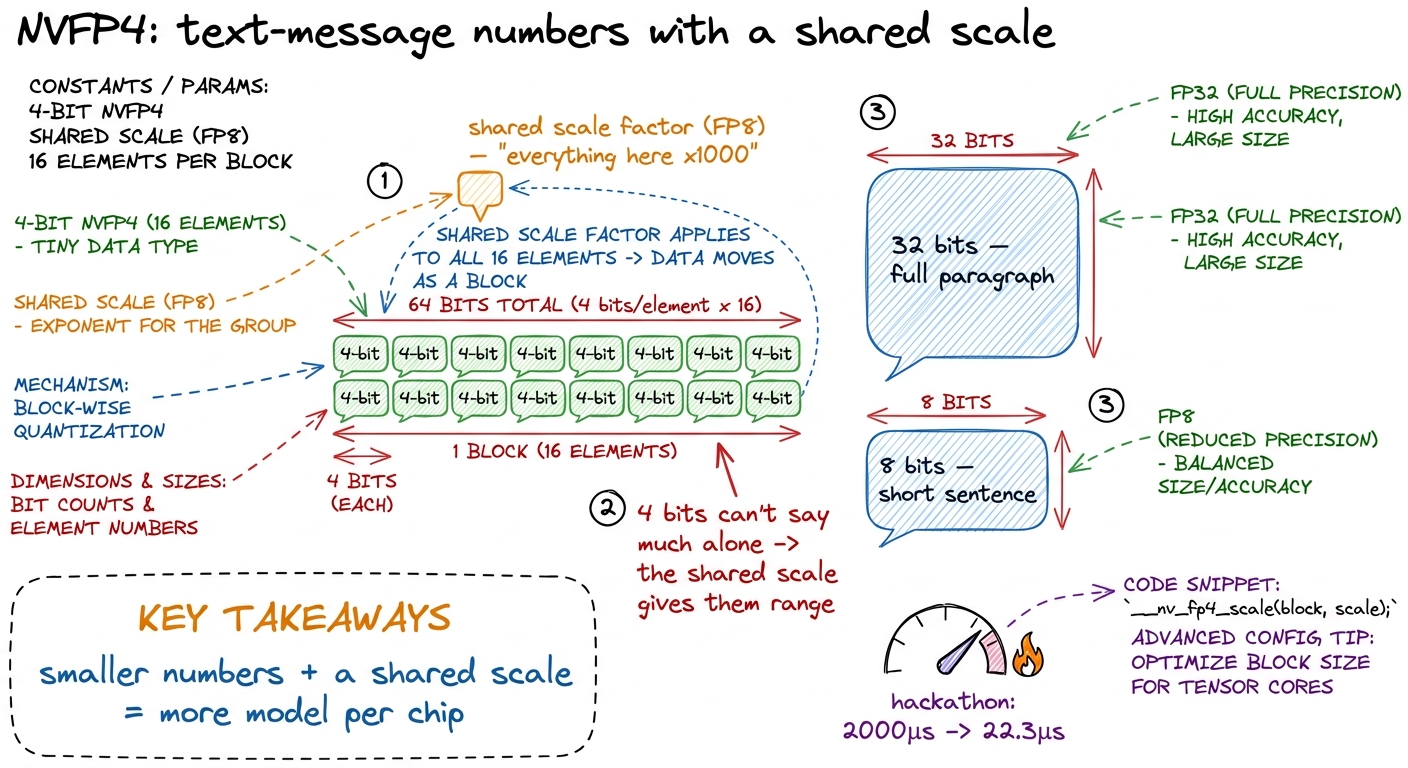
If FP32 numbers are full paragraphs and FP8 is short sentences, NVFP4 is text-message abbreviations — four bits each. You can't say much in four bits, so Blackwell adds a clever twist: a shared scale factor per small block of numbers (microscaling). It's like agreeing "everything in this text is in thousands" so tiny numbers can still mean big things. NVFP4 is e2m1 values plus an FP8 scale factor per block.
The click
The number that lands the whole workshop: the hackathon journey re-run — a batched FP4 GEMV going from 2000μs down to 22.3μs, nearly a hundredfold, through better intrinsics, bit-twiddling, instruction-level parallelism, and PTX fusion. Walk the milestones. Say: "same math, same chip — 90× faster because someone understood the bits. That 90× is a job."

The Blackwell words: tcgen05 (the new tensor-core generation instruction), TMEM (Tensor Memory — a new on-chip memory just for tensor-core operands), and CTA pairs (two thread blocks cooperating). Keep these light — the feel of "smaller numbers + shared scales + new memory" matters more than the acronyms.
🏭 In production today
Blackwell (B200/GB300-class) is the current frontier hardware that the biggest labs are deploying right now. NVFP4 is how they fit ever-larger models into the same silicon by shrinking the numbers. This workshop puts students on the literal cutting edge — the formats and instructions here are months old, not years.
W5's anchor: NVFP4 as tiny 4-bit numbers rescued by a shared block scale factor.figure rendering · W5's anchor: NVFP4 as tiny 4-bit numbers rescued by a shared block sca
W5's anchor: NVFP4 as tiny 4-bit numbers rescued by a shared block scale factor.

Running the session (3 hours):

  • 0–30 min — Number formats as message lengths: FP32 → FP8 → NVFP4. Draw the shared scale factor. This is the conceptual core.
  • 30–70 min — Blackwell hardware tour: tcgen05, TMEM, CTA pairs — kept intuitive.
  • 70–80 min — Break.
  • 80–150 min — The hackathon re-run, live and staged: 2000μs → 22.3μs, one optimization at a time (intrinsics vs bit-twiddling, ILP, PTX fusion). Show each speedup as it lands.
  • 150–180 min — CuTe-DSL vs raw CUDA paths for FP4; when each is worth it.
⚠️ Where students trip
Students think 4-bit numbers must destroy accuracy. The fix is the block scale: individual 4-bit values are crude, but a shared scale per small block keeps the group's range intact, so the accuracy loss is far smaller than "4 bits" suggests. Line: "It's not four bits alone — it's four bits with a shared exponent, and that changes everything."

W6 — Frontier finale: DeepSeek, DSpark & AI that writes kernels

What it's really about: the grand finale, in three hours. First, how DeepSeek's real stack squeezes GPUs. Second — the mind-bender — how AI models are now writing GPU kernels themselves. Third, the capstone demos.

🧠 Metaphor
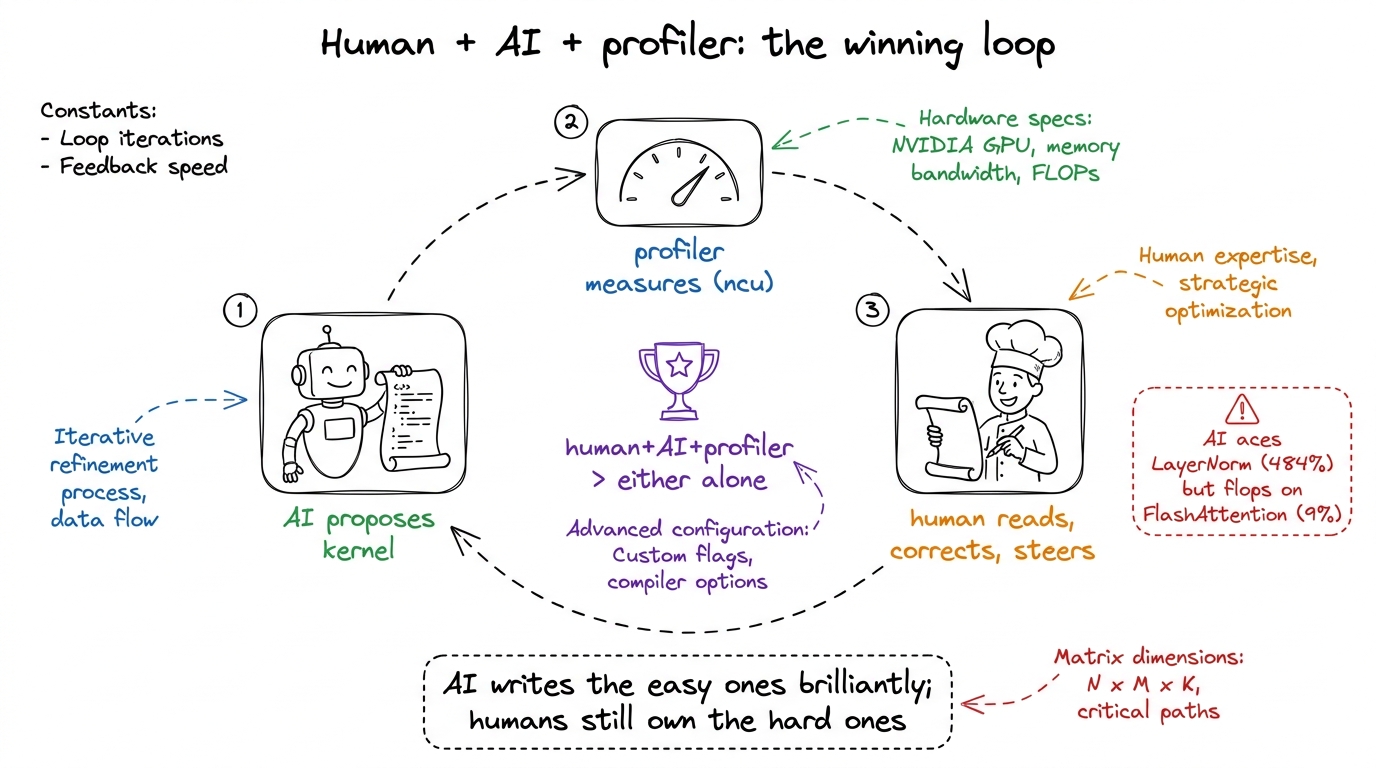
Hour two is the twist that lands the whole workshop: we've spent weeks learning to write kernels by hand, and now we watch an AI do it — like teaching someone to cook for a month and then revealing the kitchen has a robot that also cooks. The lesson isn't "you're obsolete." It's the opposite: the robot cooks best when a trained human tastes and corrects it. The human + AI + profiler loop beats either alone.

Hour 1 — the DeepSeek stack. MLA (multi-head latent attention) and its FlashMLA decode kernel; DeepGEMM FP8/MoE (deep_gemm_mega_moe); V4-Pro's sparse attention (27% of the FLOPs at 1M context, 10% of the KV cache); and DSpark — a speculative-decoding module. Teach why speculative decoding is a kernels problem: a small draft model proposes several tokens, the big model verifies them all in parallel, and special acceptance kernels keep the accepted ones. Parallel verify + acceptance = kernels.

Hour 2 — AI-generated kernels. This is the emotional peak.
The click
The numbers that make the room go quiet. KernelBench with test-time scaling ("monkeys"): DeepSeek-V3 solves 4% of kernels on one try, 37% with 100 samples, and 72% with profiler feedback. CRFM's branching search with natural-language optimization ideas hit 484% of PyTorch on LayerNorm and 180% on Conv2D. Then the honesty that builds trust: it failed at FlashAttention (9%) and only reached 52% on FP16 matmul. Say: "AI writes brilliant kernels for the easy-to-medium ones, and still needs a human for the hard ones — like FlashAttention, which you built in Week 1."
🏭 In production today
This closes the loop to the whole Vizuara world: the human+AI+profiler loop is a harness — a system that proposes, compiles, profiles, and iterates. That's a direct cross-link to Vizuara's Harness Engineering workshop. Kevin's multi-turn RL and KernelBook are the training data and methods making this work. Frame it: "the future kernel engineer drives the harness — and to drive it well you must know what good looks like, which is everything you learned in this course."
W6's closing image: the proposer-profiler-human loop that beats any single approach.figure rendering · W6's closing image: the proposer-profiler-human loop that beats any si
W6's closing image: the proposer-profiler-human loop that beats any single approach.
🎤 Say this at the board
The closing line of the entire workshop, deliver it slowly: "For a month you learned to make one operation fast with your own hands. Now the machines are learning it too. That doesn't make you smaller — it makes you the person who knows whether the machine got it right. That's the job. That's why we started with a receipt and a dot product, and that's where it ends."

Hour 3 — capstone demos. Students present their "You vs the machine" worklogs (they hand-optimized a kernel and ran an LLM-in-the-loop against it), a leaderboard, certificates.

Running the finale (3 hours, one hour each):

  • Hour 1 (0–60) — DeepSeek stack, at the level of "what each piece does and why it's a kernel." MLA/FlashMLA, DeepGEMM/MoE, sparse attention, DSpark speculative decoding.
  • Hour 2 (60–120) — AI-generated kernels: KernelBench, test-time scaling monkeys, CRFM results including the failures, Kevin/RL, the harness cross-link.
  • Hour 3 (120–180) — Capstone demos, leaderboard, certificates, send-off.
⚠️ Where students trip
When students see "AI writes kernels," some panic ("why did I learn this?") and others dismiss it ("it can't really work"). Both are wrong, and the fix is the same sentence: "It works on the easy-to-medium kernels and fails on the hard ones you now know how to write — so you're not replaced, you're the one who can tell good from garbage and steer the loop." Point at their own Week-1 FlashAttention as the proof.

You can now teach

  • W1 — FlashAttention: naive vs Flash as "writing the giant notebook vs doing it in your head," online softmax by hand, the causal-masked forward build, and the memory-traffic jaw-drop vs PyTorch SDPA.
  • W2 — Hopper: the producer/consumer kitchen (TMA, WGMMA, warp specialization) and why beating cuBLAS is logistics, not math.
  • W3 — the abstraction ladder: Triton vs CUTLASS/CuTe vs raw CUDA, the 40-lines-vs-600-lines moment, and the rule for which rung to stand on.
  • W4 — serving kernels: prefill (fat compute-bound matmul) vs decode (skinny memory-bound GEMV), PagedAttention, fusion, and quantized kernels — the vLLM stack.
  • W5 — Blackwell & NVFP4: 4-bit "text-message" numbers rescued by a shared block scale, the Blackwell hardware feel, and the 2000μs → 22.3μs hackathon story.
  • W6 — the finale: the DeepSeek stack, AI-generated kernels with their real numbers and honest failures, and the human+AI+profiler loop that sends students off knowing exactly why their skills still matter.